
Data Ferry Deployment
Data Ferry provides a controlled way to exchange files between isolated network zones. In the BabelBird interface, the module is named Transfer Files. It is designed for R&D and office networks, secure and non-secure zones, and organizations operating several independent network domains.
Department permissions create logical separation inside one system. When zones are separated by firewalls, gateways or physical networks, Data Ferry provides a dedicated cross-network file channel. The transfer supports direction controls, receiver tokens, SSL encryption, designated recipients, approval and complete records.
Data Ferry transfers files only. It does not carry Zhichao AI, knowledge-base or automation services into the destination network. After arrival, files remain governed by permissions, watermarks, download controls and audit policies in the destination BabelBird system.
Core Capabilities
| Capability | Description |
|---|---|
| Cross-network transfer | Transfer files between two or more independent BabelBird systems |
| Direction control | Configure bidirectional transfer or make a system receive-only |
| Encryption and authentication | Use SSL in transit and a token generated by the receiving endpoint |
| Recipient scope | Assign recipients to each endpoint for different departments or business groups |
| Approval | Assign reviewers and decide which transfer directions require approval |
| Audit trail | Record sending, receiving, review results and timestamps |
| File-level control | Transfer files, not folders; multiple files can be submitted together |
Deployment Models
Standard Dual-System Model
Deploy a complete BabelBird system in each zone and enable Data Ferry on both sides. Receiving and sending endpoints can then establish either one-way or two-way channels.
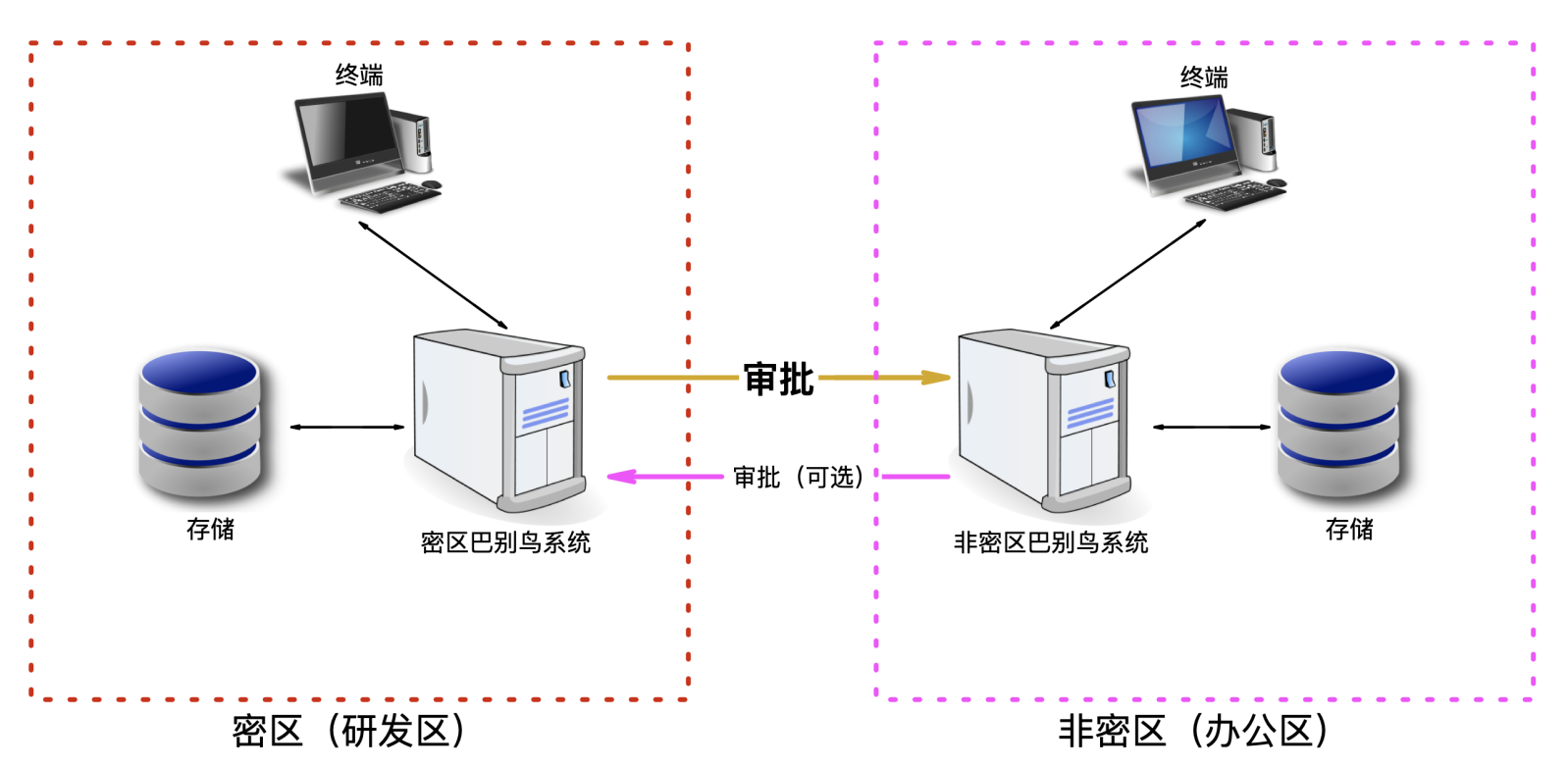
This model is appropriate when both networks need full file management, permissions, approval and audit. Policies can differ by direction, such as allowing non-secure-to-secure transfer without approval while requiring approval for outbound files.
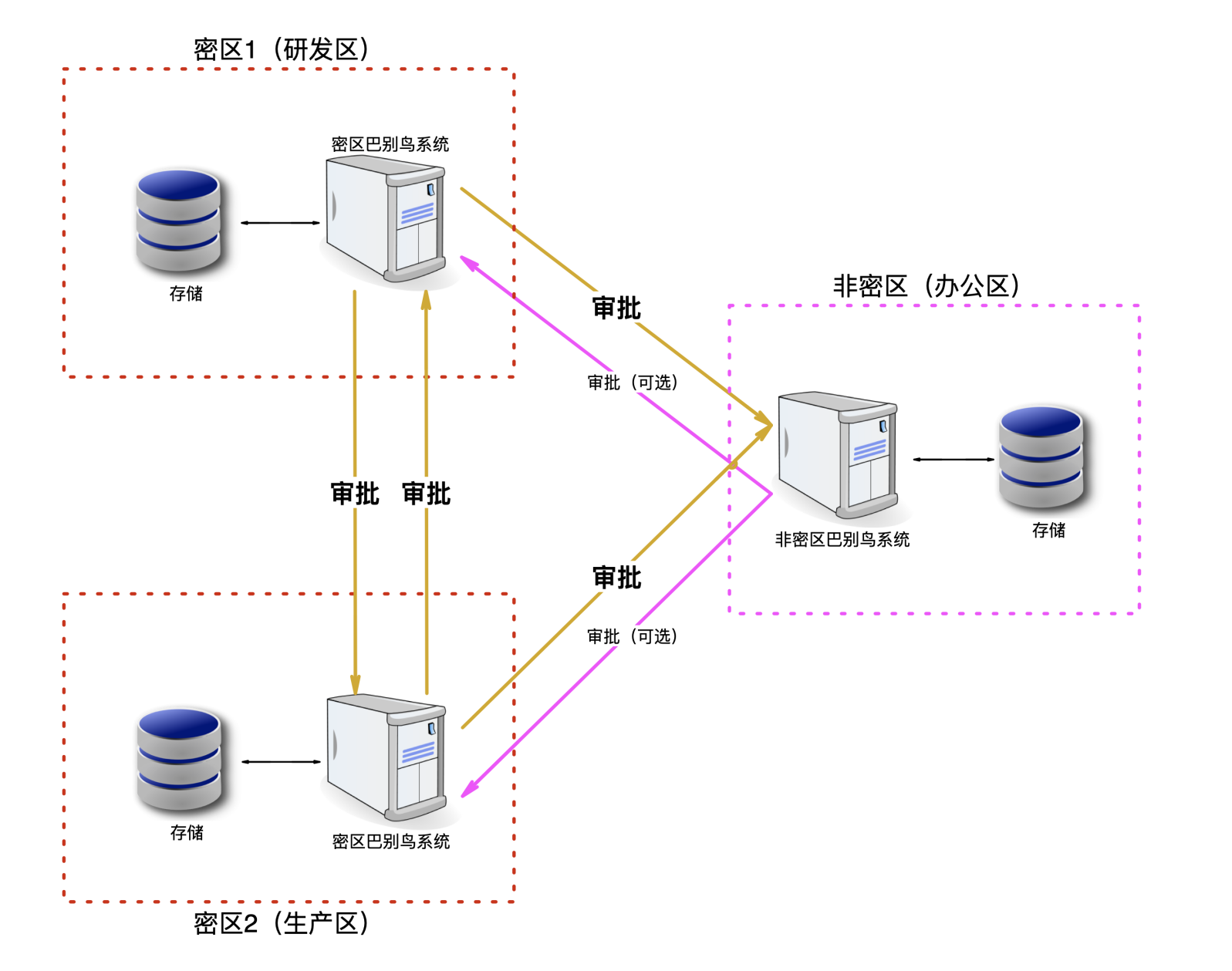
Multi-Network, Multi-System Model
A BabelBird system can create several endpoints and connect to systems in multiple independent networks. Each endpoint can use its own token, recipients and approval policy.
Simplified One-Way Model
When files only need to move quickly from a non-secure zone into a secure zone, deploy full BabelBird in the secure zone and a lightweight file-transfer service in the non-secure zone. This model supports non-secure-to-secure transfer only and normally allows that inbound direction without approval.
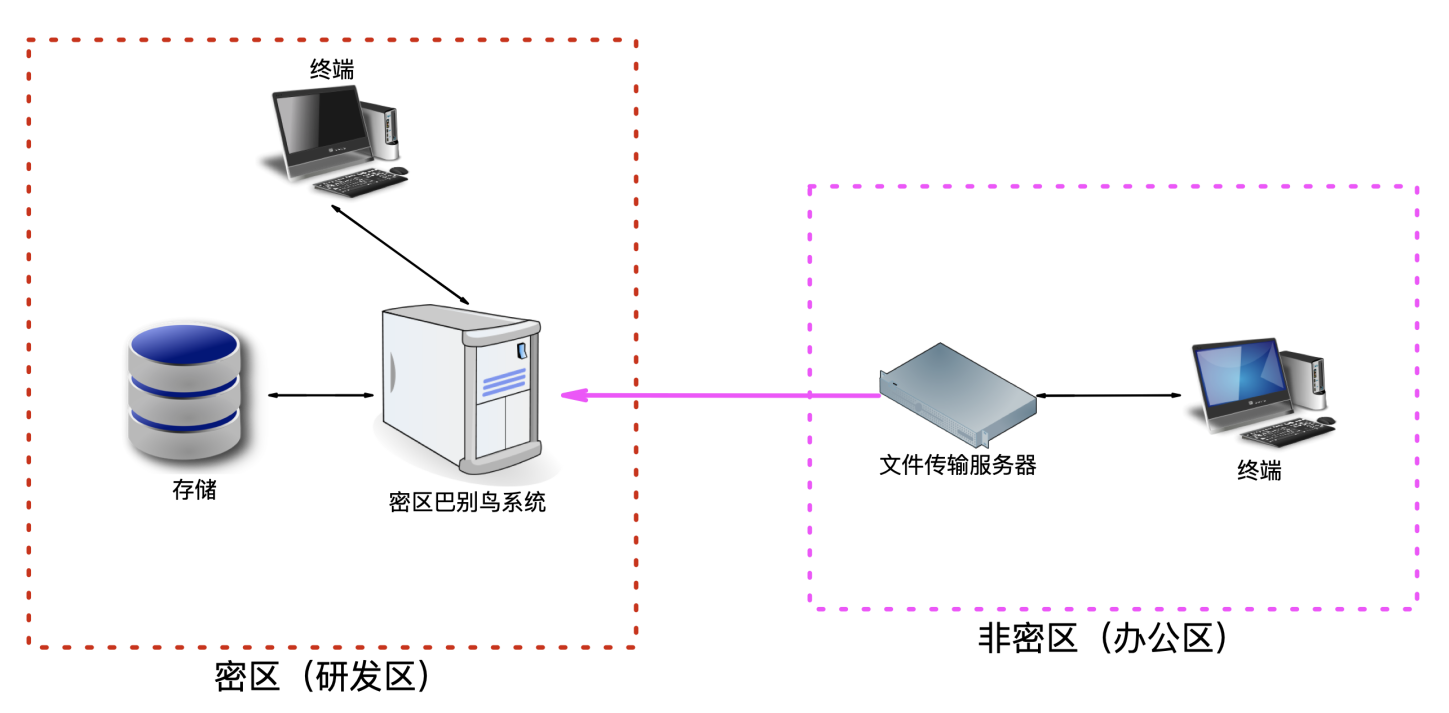
| Item | Standard Dual-System | Multi-Network | Simplified One-Way |
|---|---|---|---|
| Full BabelBird systems | One in each zone | As required in each network | Destination secure zone only |
| Direction | One-way or two-way | Configured per channel | Non-secure to secure only |
| Endpoints | Based on business scope | Multiple networks and departments | Usually one or a few destinations |
| Approval | Configured by direction | Configured by channel | Inbound is normally approval-free |
| Best fit | R&D and office exchange | Multiple sites or security domains | Fast, low-complexity inbound transfer |
Administrator Configuration
1. Confirm Module Availability
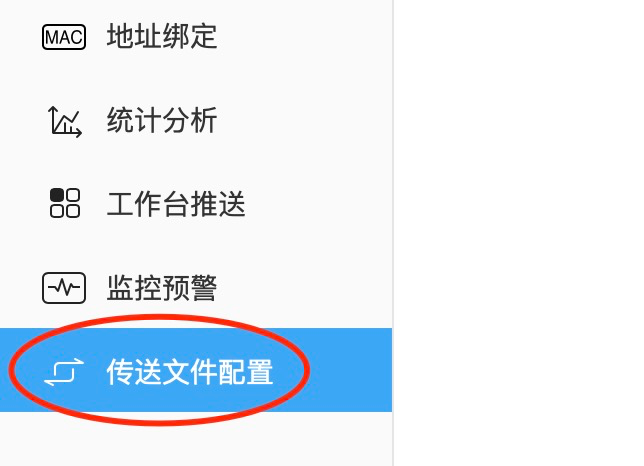
After Data Ferry is deployed, Transfer File Configuration appears in the Enterprise Console. If it is missing, verify the license, deployment and administrator permissions.
2. Create A Receiving Endpoint
Create the receiving endpoint in the destination system. It generates a token used to establish the channel. Deliver the token to the source administrator through a protected channel. One system can provide several receiving endpoints for different departments, projects or network zones.
3. Create A Sending Endpoint
In the source system, enter the sending endpoint name and description, destination endpoint name, receiver token and destination domain, then validate connectivity.
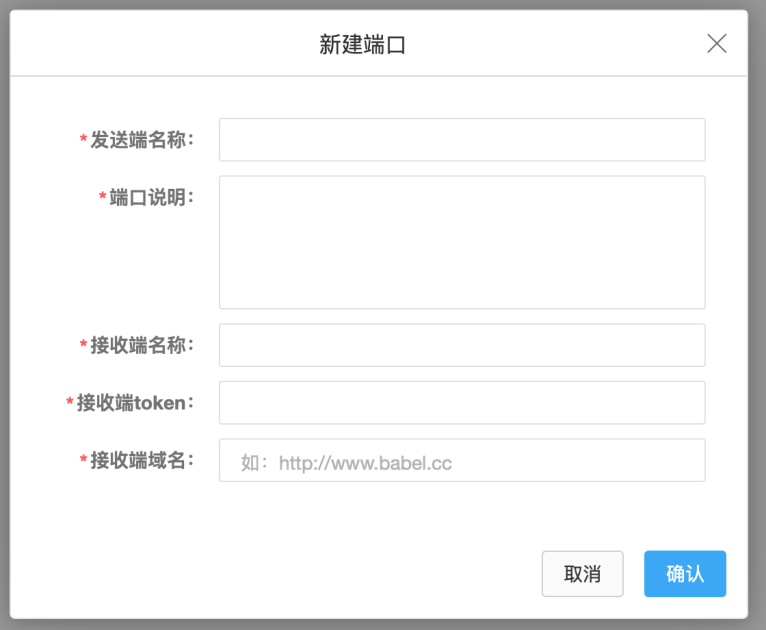
A system with a receiving endpoint but no sending endpoint is technically receive-only.
4. Assign Recipients And Reviewers
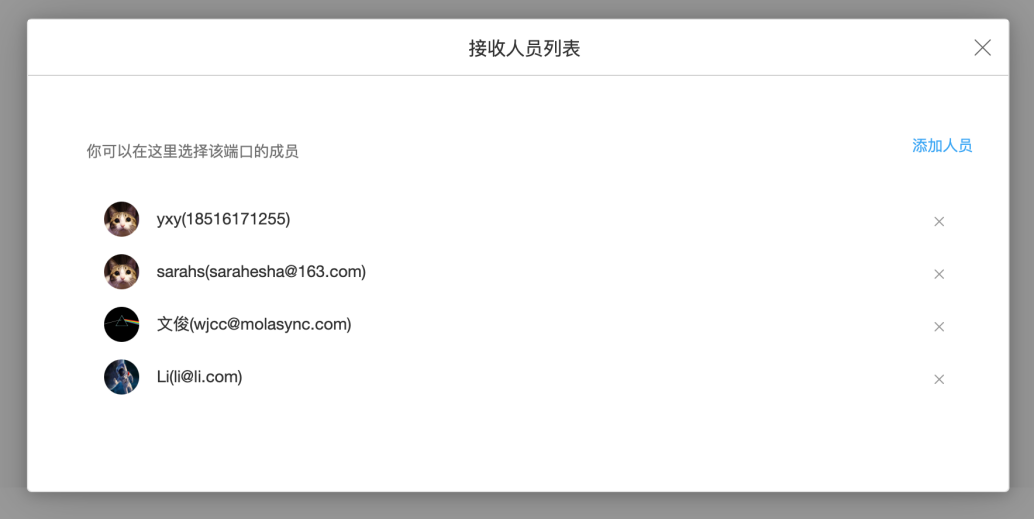
Assign the members who can receive files and the administrators or department managers who can review transfers. Separate endpoints can prevent files from entering the wrong business scope.
5. Configure Approval By Direction
Typical policies include approval-free import from a non-secure zone, mandatory approval for export from a secure zone, or approval in both directions for highly sensitive environments.
6. Configure The Network Channel
Allow only the source, destination and transfer ports defined in the implementation plan. Data Ferry uses SSL. Port numbers, certificates and domains must follow the deployed version and approved network design rather than ordinary Web access assumptions.
User Workflow
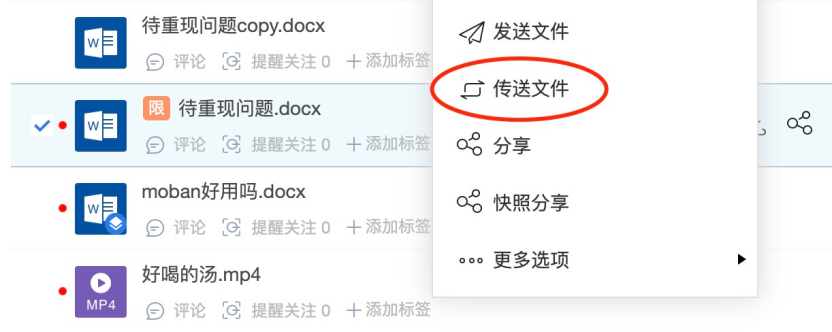
- Select one or more files in the file list.
- Choose Transfer Files from the context menu and select a destination endpoint.
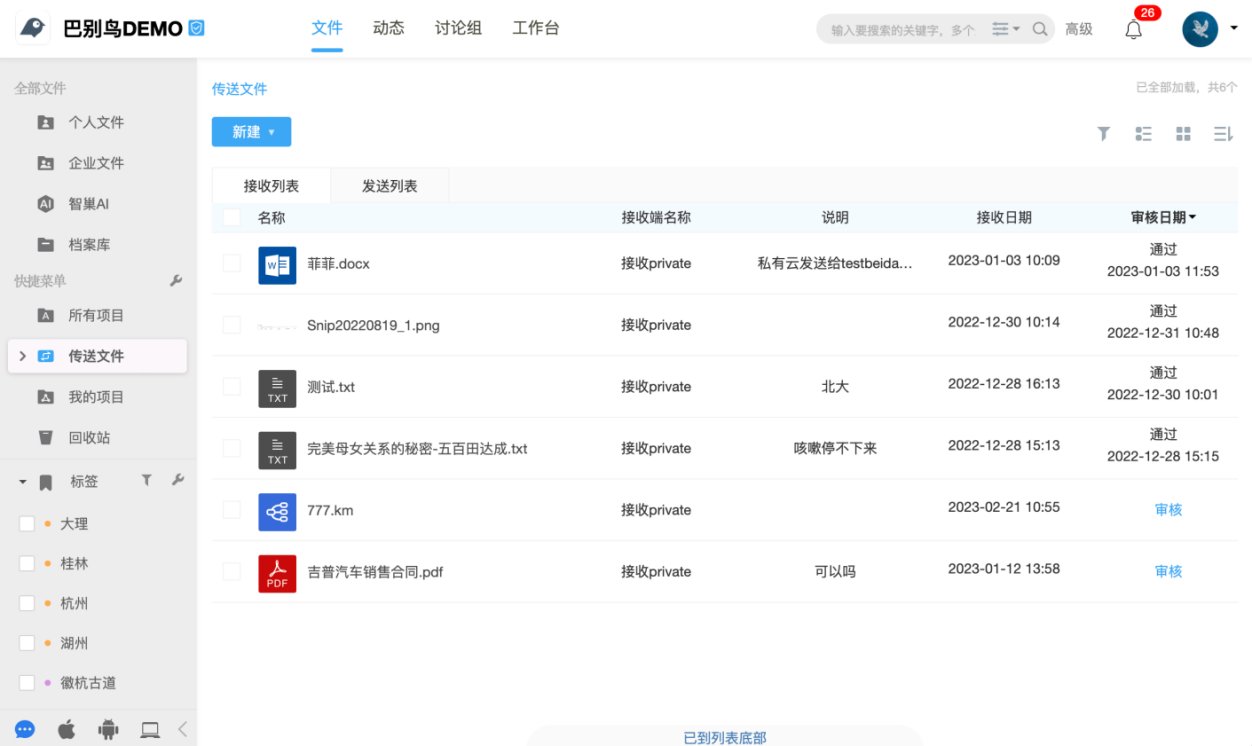
- If approval is required, the task enters the review list; otherwise it enters the transfer queue directly.
- After approval, the system sends the files through the encrypted channel.
- Recipients find approved files under Transfer Files in their account.
- Administrators trace the process through send, receive and audit records.
Security Boundaries
- Data Ferry transfers files, not folders, so important files cannot be hidden inside nested folders to bypass review.
- Users can select multiple files in one submission.
- The source folder structure, members, comments, versions and project settings are not synchronized.
- After arrival, destination storage location and permissions should be confirmed.
- Receiver tokens are channel credentials and should be rotated after exposure, personnel changes or policy updates.
- Sending, receiving and approval records should be included in periodic security reviews.
Go-Live Checklist
| Check | Acceptance Criteria |
|---|---|
| Network | Only approved systems and ports can communicate across zones |
| Credentials | Receiver tokens are correct and are not exposed in public channels |
| Direction | Receive-only systems have no sending endpoint; both directions are tested separately when enabled |
| People | Recipients, reviewers and administrators match the approved policy |
| Approval | Approval-required and approval-free paths behave correctly; rejected files are not transferred |
| Files | Single, multiple, same-name and large-file cases are verified |
| Audit | Operator, status, time, sending and receiving records are searchable |
| Failure | Network interruption produces a clear state without untraceable duplication or loss |